This automates the process of having to build a docker image and upload it to the registry (hub.docker.com).
It builds the docker image and it uploads it to git.lolcat.ca docker registry. You can change this to other registry like quay.io.
You will need to setup a runner in any server you have so it's able to fetch new commits, build the image and then upload it to the server. Without a runner, the job will never run.
I'll leave a small tutorial down here so you can setup a runner on the server:
Install docker on the server, enable the docker service and add the user to the docker group (make sure to relogin after adding the user to the group)
Register the runner using forgejo-runner register, get the registration token from https://git.lolcat.ca/user/settings/actions/runners and set the label to: docker:docker://ghcr.io/catthehacker/ubuntu:act-22.04
Keep the runner running using forgejo-runner daemon & (you can use tmux, a systemd service, whatever)
Copy the token generated and paste it as the token value
Try it?
Every time you modify the source code, it will build a new image under git.lolcat.ca/lolcat/4get:latest, every version is going to be tagged with the date and the commit.
This automates the process of having to build a docker image and upload it to the registry (hub.docker.com).
It builds the docker image and it uploads it to `git.lolcat.ca` docker registry. You can change this to other registry like `quay.io`.
You will need to setup a `runner` in any server you have so it's able to fetch new commits, build the image and then upload it to the server. Without a runner, the job will never run.
I'll leave a small tutorial down here so you can setup a runner on the server:
1. Install docker on the server, enable the docker service and add the user to the `docker` group (make sure to relogin after adding the user to the group)
2. Download https://code.forgejo.org/forgejo/runner/releases/download/v4.0.1/forgejo-runner-4.0.1-linux-amd64 (not `5.x.x`, it's broken) (and rename it to `forgejo-runner` xd, you can leave it inside /usr/bin if you want)
3. Register the runner using `forgejo-runner register`, get the registration token from https://git.lolcat.ca/user/settings/actions/runners and set the label to: `docker:docker://ghcr.io/catthehacker/ubuntu:act-22.04`
4. Keep the runner running using `forgejo-runner daemon &` (you can use tmux, a systemd service, whatever)
5. Go to https://git.lolcat.ca/lolcal/4get/settings/actions/secrets and add a secret with Name `USERNAME` with your gitea username (`lolcat`) and a secret with name `TOKEN`, you can get the token using https://git.lolcat.ca/user/settings/applications; set a name for it, and set permissions `repository: read; package: read and write`
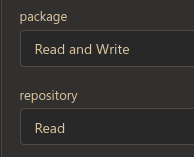
6. Copy the token generated and paste it as the token value
7. Try it?
Every time you modify the source code, it will build a new image under `git.lolcat.ca/lolcat/4get:latest`, every version is going to be tagged with the date and the commit.
https://git.lolcat.ca/ckg/-/packages/container/4get/2024.11.26-1545e91

For 5 year olds: forgejo-runner calls Docker to build Dockerfile, it waits until it's finishes and then the image is pushed to the "docker registry" which is git.lolcat.ca
You can run forgejo-runner on any machine.
For 5 year olds: `forgejo-runner` calls Docker to build `Dockerfile`, it waits until it's finishes and then the image is pushed to the "docker registry" which is `git.lolcat.ca`
You can run `forgejo-runner` on any machine.
Blocking a user prevents them from interacting with repositories, such as opening or commenting on pull requests or issues. Learn more about blocking a user.



This automates the process of having to build a docker image and upload it to the registry (hub.docker.com).
It builds the docker image and it uploads it to
git.lolcat.cadocker registry. You can change this to other registry likequay.io.You will need to setup a
runnerin any server you have so it's able to fetch new commits, build the image and then upload it to the server. Without a runner, the job will never run.I'll leave a small tutorial down here so you can setup a runner on the server:
dockergroup (make sure to relogin after adding the user to the group)5.x.x, it's broken) (and rename it toforgejo-runnerxd, you can leave it inside /usr/bin if you want)forgejo-runner register, get the registration token from https://git.lolcat.ca/user/settings/actions/runners and set the label to:docker:docker://ghcr.io/catthehacker/ubuntu:act-22.04forgejo-runner daemon &(you can use tmux, a systemd service, whatever)USERNAMEwith your gitea username (lolcat) and a secret with nameTOKEN, you can get the token using https://git.lolcat.ca/user/settings/applications; set a name for it, and set permissionsrepository: read; package: read and writeEvery time you modify the source code, it will build a new image under
git.lolcat.ca/lolcat/4get:latest, every version is going to be tagged with the date and the commit.https://git.lolcat.ca/ckg/-/packages/container/4get/2024.11.26-1545e91
1545e91805to91a792d169That's awesome bro, but all of this docker shit went over my head. What pushes the docker image? My machine doing
git pushor git itself?For 5 year olds:
forgejo-runnercalls Docker to buildDockerfile, it waits until it's finishes and then the image is pushed to the "docker registry" which isgit.lolcat.caYou can run
forgejo-runneron any machine.Pull request closed