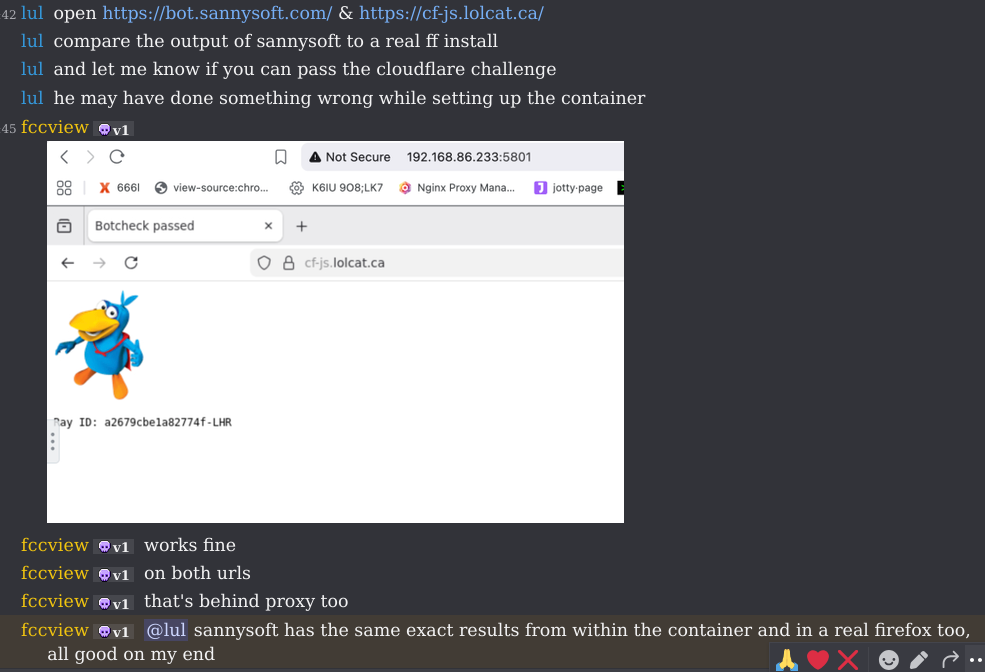
So, yesterday you told me that the containerized Firefox container couldn't pass the botchecks, but the degoog guy managed to do it just fine
He's using jlesage/firefox. It also passes the sannysoft botchecks, everything seems to check out.
So, yesterday you told me that the containerized Firefox container couldn't pass the botchecks, but the degoog guy managed to do it just fine
He's using `jlesage/firefox`. It also passes the sannysoft botchecks, everything seems to check out.
for context: I said I ran a google search with it and it gave me a captcha, so I said it was probably not an avenue
I reran it again today but this time it didn't give me an captcha, both times I had only tried the defaults
not sure why it didn't work the first time (which was just around 12 hours ago) it could have been something simple... for example the timezone is not necessarily correct unless you set it
here are some (notable) differences between a default firefox profile and the container (using bot.sannysoft.com)
video card is probably the biggest one
(mesa, llvmpipe or similar)
webcam and microphone is zero
there is a screen size mismatch, it uses 1920x1080 by default, whereas my screen is 1366x768
running it with the same resolution doesn't magically fix the video card stuff though
window.screenX being different (position of window on screen...) being 0 without other privacy settings might be a tell
by default the web audio is disabled
when it's enabled there is still "videoinput: id = " missing
overflow depth seems to be generally less, sometimes only slightly
attaching a picture of an example with a huge difference
might be a tell, just wanted to mention it
for context: I said I ran a google search with it and it gave me a captcha, so I said it was probably not an avenue
I reran it again today but this time it didn't give me an captcha, both times I had only tried the defaults
not sure why it didn't work the first time (which was just around 12 hours ago) it could have been something simple... for example the timezone is not necessarily correct unless you set it
here are some (notable) differences between a default firefox profile and the container (using bot.sannysoft.com)
video card is probably the biggest one
(mesa, llvmpipe or similar)
webcam and microphone is zero
there is a screen size mismatch, it uses 1920x1080 by default, whereas my screen is 1366x768
running it with the same resolution doesn't magically fix the video card stuff though
window.screenX being different (position of window on screen...) being 0 without other privacy settings might be a tell
by default the web audio is disabled
when it's enabled there is still "videoinput: id = " missing
overflow depth seems to be generally less, sometimes only slightly
attaching a picture of an example with a huge difference
might be a tell, just wanted to mention it
Yeah its better to keep away from firefox in docker then. Google likes to make you think you made it through the bot challenge page, its after you make 1-2 requests that it flags your IP and locks you out of everything.
Yeah its better to keep away from firefox in docker then. Google likes to make you think you made it through the bot challenge page, its after you make 1-2 requests that it flags your IP and locks you out of everything.
You are not authorized to merge this pull request.
This pull request can be merged automatically.
This branch is out-of-date with the base branch
View command line instructions
Checkout
From your project repository, check out a new branch and test the changes.
Blocking a user prevents them from interacting with repositories, such as opening or commenting on pull requests or issues. Learn more about blocking a user.

adds a Dockerfile, example docker-compose, and updates
extra/4play/page-render.jsto read values from envSo, yesterday you told me that the containerized Firefox container couldn't pass the botchecks, but the degoog guy managed to do it just fine
He's using
jlesage/firefox. It also passes the sannysoft botchecks, everything seems to check out.for context: I said I ran a google search with it and it gave me a captcha, so I said it was probably not an avenue
I reran it again today but this time it didn't give me an captcha, both times I had only tried the defaults
not sure why it didn't work the first time (which was just around 12 hours ago) it could have been something simple... for example the timezone is not necessarily correct unless you set it
here are some (notable) differences between a default firefox profile and the container (using bot.sannysoft.com)
video card is probably the biggest one
(mesa, llvmpipe or similar)
webcam and microphone is zero
there is a screen size mismatch, it uses 1920x1080 by default, whereas my screen is 1366x768
running it with the same resolution doesn't magically fix the video card stuff though
window.screenX being different (position of window on screen...) being 0 without other privacy settings might be a tell
by default the web audio is disabled
when it's enabled there is still "videoinput: id = " missing
overflow depth seems to be generally less, sometimes only slightly
attaching a picture of an example with a huge difference
might be a tell, just wanted to mention it
Yeah its better to keep away from firefox in docker then. Google likes to make you think you made it through the bot challenge page, its after you make 1-2 requests that it flags your IP and locks you out of everything.
View command line instructions
Checkout
From your project repository, check out a new branch and test the changes.